macOS updatesRelease notes
macOS 27 Golden Gate: the biggest changes, and what to check before you update
Short answer
macOS 27 Golden Gate came out on 14 September 2026. It runs only on Macs with Apple silicon, so Intel Macs stay on macOS 26 Tahoe. The changes you'll notice first are a slider that controls how see-through Liquid Glass is, a new Siri with its own app, a calmer menu bar, and fixes to several Tahoe design complaints. The current version is macOS 27.2.
On this page
Check these before you update
- Your Mac must have Apple silicon. Every Mac with an M-series chip (2020 and later) and the MacBook Neo can update. No Intel Mac can. See is my Mac compatible with macOS 27.
- Intel-only apps are on borrowed time. macOS 27 is the last version with full Rosetta support. Find out which of your apps still need it with this check.
- Menu bar managers need new versions. The menu bar is now drawn as a single window, which broke Bartender 6, Ice and similar apps. Check that yours has a macOS 27 version first. See which menu bar apps work on macOS 27.
- If you live in Mission Control and Spaces, read the known issues. Many people report lag and black screens with several displays. See macOS 27 known issues.
- Expect a slow day or two. Spotlight, Mail and Photos rebuild their indexes after the update, which uses battery and makes fans spin.
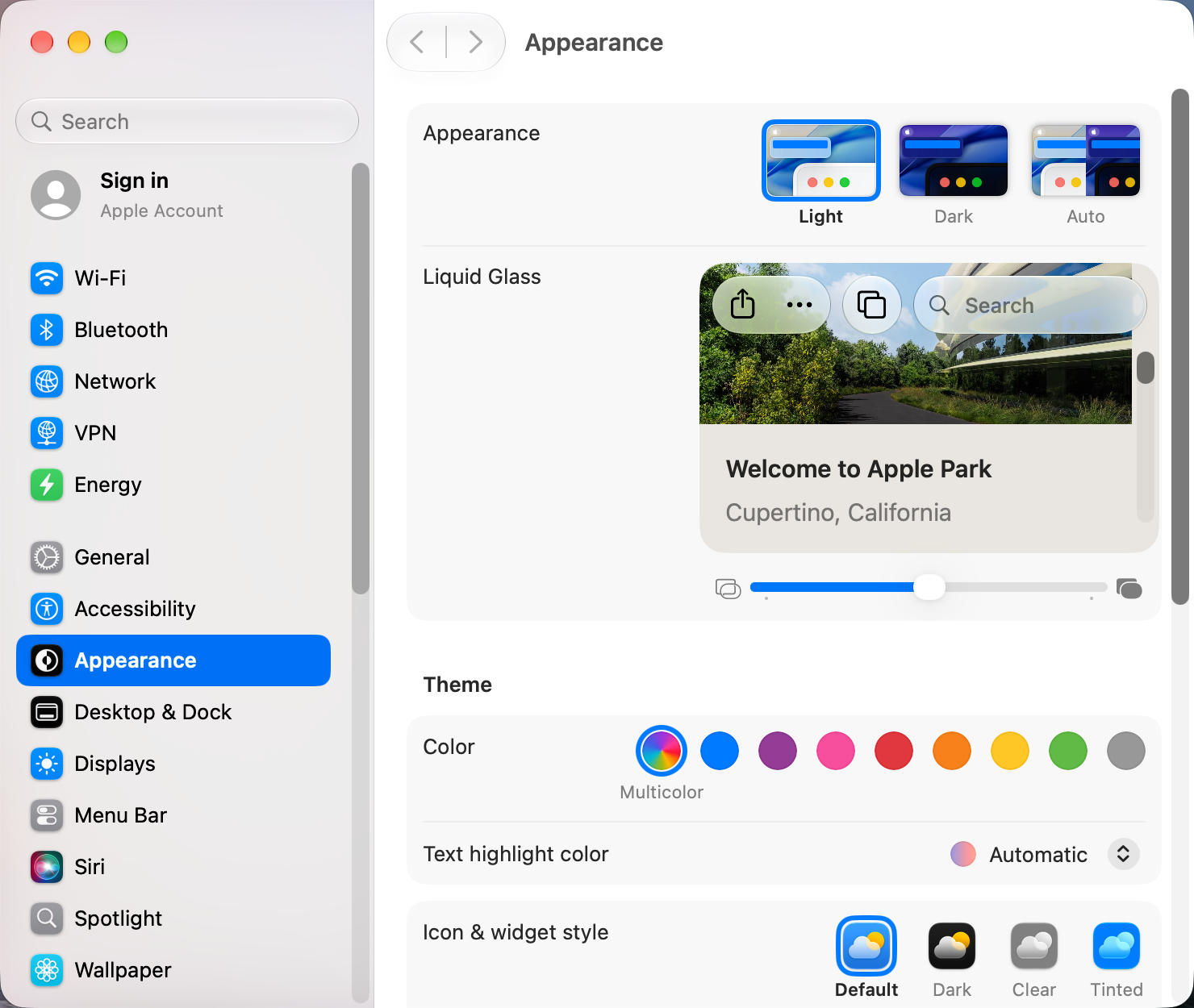
Liquid Glass you can tone down
Tahoe offered only a Clear or Tinted look. macOS 27 replaces that with a slider in System Settings › Appearance that runs from nearly clear to fully opaque, and it applies everywhere at once: the Dock, widgets, sidebars, toolbars and Now Playing bars. Apple also says the glass now blurs busy content behind it more, which helps readability. Steps for every version are in how to make Liquid Glass less transparent.
Design fixes for Tahoe complaints
- Most of the small icons next to menu items are gone.
- Every app window now has the same rounded corners, without the app needing an update.
- Sidebars run edge to edge again instead of floating, and sidebar icons are coloured again.
- The active window stands out more from the windows behind it.
The menu bar and the notch
When menu bar icons don't fit beside the notch, macOS 27 now shows an arrow you can click to reveal the hidden ones. You still choose which apps may show icons in System Settings › Menu Bar. Details are in how to hide menu bar icons and reach the ones behind the notch.
Siri AI
Siri gets a rebuilt assistant, called Siri AI, with its own app that keeps your conversation history across iPhone, iPad and Mac. It can find files and photos from a description, act inside apps, and answer questions about anything you select on screen. It's opt-in, in beta, and has a waiting list. It needs an M1 or later (or the MacBook Neo), and the language and region rules are strict. See how to turn on Siri AI and why it may be missing.
Smaller changes worth knowing
- Spotlight uses a rebuilt index, which should make searches in Spotlight, Mail and Photos faster once indexing finishes.
- External displays get more high-resolution and high-refresh modes, HDR for system interface elements, and window positions that stick better across displays.
- Safari can group tabs by topic, and its new Notify Me feature watches a page and alerts you when it changes.
- Finder suggests names for new files and folders based on what's in them.
- Shortcuts can build a shortcut from a plain description.
Should you update now?
If you use one display and no menu bar manager, macOS 27.2 is a reasonable update today. If you depend on Mission Control and Spaces across several monitors, or on an app that hasn't been updated, check the known issues first. Tahoe still gets security updates.
Sources and further reading
- macOS 27 Golden Gate now available: everything new · 9to5Mac
- macOS Golden Gate vs macOS Tahoe: what's new · Macworld
- macOS 27 Golden Gate includes these changes Tahoe critics will appreciate · 9to5Mac
- How to get Siri AI · Apple Support
- macOS 27: The MacStories review · MacStories
Applies tomacOS 27