macOS updatesRelease notes
Latest macOS Tahoe version: 26.7.3, and every Tahoe release
Short answer
The latest version of macOS Tahoe is 26.7.3, released on 9 November 2026 together with macOS 27.2.1. It's a security update with no new features. Tahoe gets only security fixes now: its last feature update was 26.6 in July 2026. To see your version, choose Apple menu › About This Mac.
On this page
Every macOS Tahoe version
| Version | Released | What changed |
|---|---|---|
| 26.7.3 | 9 Nov 2026 | Security fixes in Bluetooth, Messages group chats and AirPlay pairing, released with macOS 27.2.1 |
| 26.7.2 | 26 Oct 2026 | Security fixes, released with macOS 27.2 |
| 26.7.1 | 28 Sep 2026 | Security fixes (build 25G241), released with macOS 27.0.1 |
| 26.7 | 14 Sep 2026 | 28 security fixes, 20 of them in WebKit, released alongside macOS 27 |
| 26.6.2 | Aug 2026 | Security fixes |
| 26.6.1 | Aug 2026 | Bug fixes |
| 26.6 | 27 Jul 2026 | Last feature update for Tahoe |
| 26.5, 26.5.1, 26.5.2 | May to Jun 2026 | Features and fixes |
| 26.4, 26.4.1 | Mar to Apr 2026 | Features and fixes |
| 26.3, 26.3.1 | Feb to Mar 2026 | Features and fixes |
| 26.2 | Dec 2025 | Features and fixes |
| 26.1 | Nov 2025 | Features and fixes |
| 26.0, 26.0.1 | Sep 2025 | First release: Liquid Glass design, Apps replaces Launchpad |
Tahoe (macOS 26) first came out in September 2025. Apple usually patches the two previous macOS versions as well as the current one, so Tahoe should keep getting security fixes until about autumn 2028.
Who should stay on Tahoe
- Intel Macs. macOS 27 doesn't support them, so Tahoe updates are how they keep getting security fixes. See which Macs run macOS 27.
- Anyone waiting on macOS 27, for example because an important app or menu bar manager isn't ready, or because you rely on Mission Control across several displays. See macOS 27 known issues.
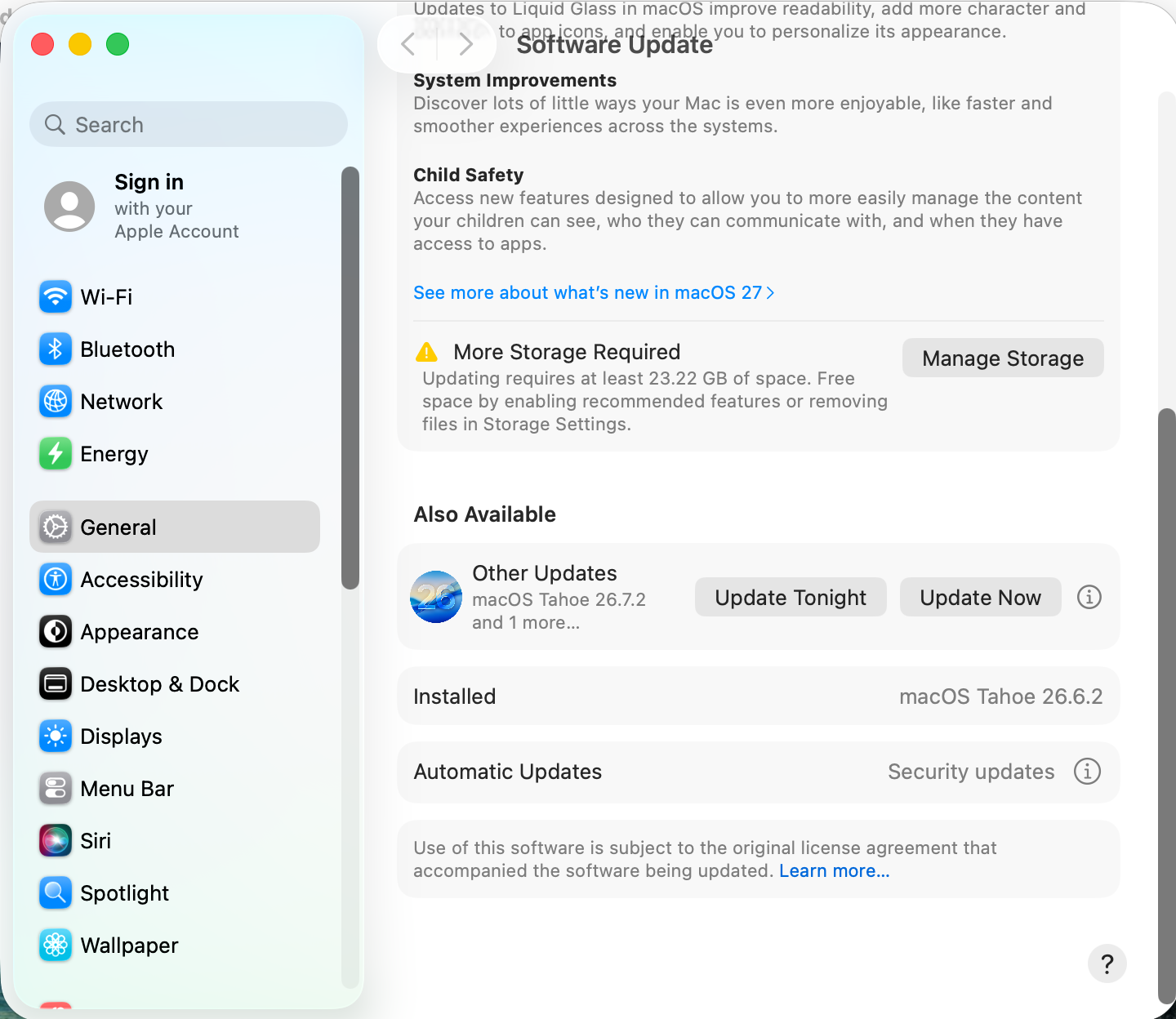
Install the Tahoe update, not macOS 27
- Open System Settings › General › Software Update.
- If macOS 27 is offered at the top, don't click Upgrade Now. Look below it for the macOS Tahoe 26.7.3 update, under Also Available › Other Updates.
- Click Update Now next to the Tahoe update.
Careful: with Automatic updates set to install macOS updates, the Mac installs point updates on its own, but it won't move you to a new major version without asking.
Still having Tahoe problems?
See common macOS Tahoe problems for Liquid Glass, battery and install fixes. Deciding whether to move up? See macOS 27 vs Tahoe vs Sequoia.
Sources and further reading
- About the security content of macOS Tahoe 26.7.3 · Apple Support
- About the security content of macOS Tahoe 26.7.1 · Apple Support
- Apple releases macOS 27.2.1 Golden Gate, Tahoe 26.7.3, and Sequoia 15.8.3 · 9to5Mac
- macOS Tahoe 26.7 update: everything you need to know · Mr. Macintosh
Applies toTahoe
Reader tips
No tips yet. If something else worked for you, or a step looks different on your Mac, add it here.